tmux tidbits i recently adopted
some cool little tmux snippets i recently added to my config.
- menu: modified window menu
- menu: control menu
- better nested remote sessions
- improved window movement
menu: modified window menu
i only recently discovered tmux’s built-in window menu (via prefix-<) but found that it included a few things i knew i would never use and a couple of things which i did want weren’t on there. so i just overrode the default bind with my own modified version of the built-in menu.
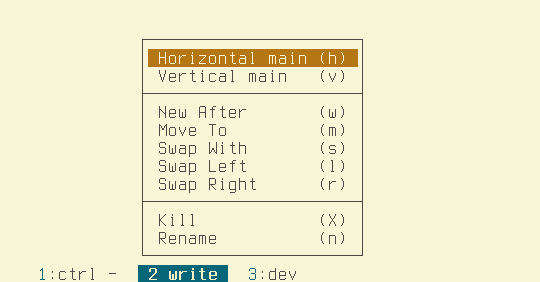
it drops the mark operations and adds custom move/swap-window entries (move-to, swap-with, swap left/right) alongside the usual kill/rename actions.
bind -N "Window menu"   "<" display-menu -x W -y W \
    "Horizontal main"   'h' { select-layout main-horizontal } \
    "Vertical main"     'v' { select-layout main-vertical } \
    "" \
    "New After"         'w' { new-window -a } \
    "#{?#{>:#{session_windows},1},,-}Move To"       m {choose-window -Z "move-window -t '%%'"} \
    "#{?#{>:#{session_windows},1},,-}Swap With"     s {choose-window -Z "swap-window -d -t '%%'"} \
    "#{?#{>:#{session_windows},1},,-}Swap Left"     l {swap-window -t:-1} \
    "#{?#{>:#{session_windows},1},,-}Swap Right"    r {swap-window -t:+1} \
    "" \
    "Kill"          'X' {kill-window} \
    "Rename"        'n' {command-prompt -FI \"#W\" {rename-window -t '#{window_id}' -- '%%'}}
menu: global control menu
after setting up the custom window menu i dug a bit further into the menu system and decided to create a kind of global “control menu” — a catch-all for operations common enough to need but not common enough for a keybind to stick The point is not having to remember anything except that the menu exists.
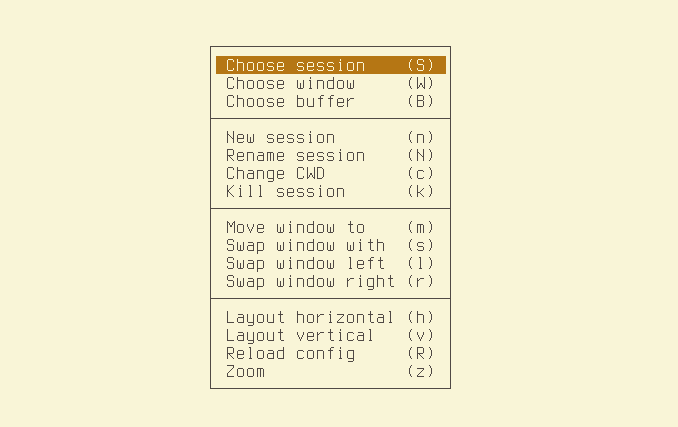
move/swap entries are conditionally greyed out when the session has only one window (#{?#{>:#{session_windows},1},,-}).
bind -N "Control Menu" -n M-q display-menu -x C -y C \
    "Choose session"    S { choose-session -Z } \
    "Choose window"     W { choose-window -Z } \
    "Choose buffer"     B { choose-buffer -Z } \
    "" \
    "New session"       n { command -p 'Session name:' {new-session -s "%%"} }\
    "Rename session"    N { command -p 'Session name:' -I '#S' {rename-session -- "%%"} } \
    "Change CWD"        c { command -p 'Working dir:' {attach-session -t . -c "%%"} }\
    "Kill session"      k { kill-session } \
    "" \
    "#{?#{>:#{session_windows},1},,-}Move window to"       m {choose-window -N "move-window -t '%%'"} \
    "#{?#{>:#{session_windows},1},,-}Swap window with"     s {choose-window -N "swap-window -d -t '%%'"} \
    "#{?#{>:#{session_windows},1},,-}Swap window left"     l {swap-window -t:-1} \
    "#{?#{>:#{session_windows},1},,-}Swap window right"    r {swap-window -t:+1} \
    "" \
    "Layout horizontal"   h { select-layout main-horizontal } \
    "Layout vertical"     v { select-layout main-vertical } \
    "Reload config"     R "source-file ~/.tmux.conf" \
    "#{?window_zoomed_flag,Unzoom,Zoom}" z "resize-pane -Z"
better nested remote sessions
this is a cool way to get a better experience with nested remote tmux sessions. think of it as an ‘embedded-mode’ toggle for cases where you want to connect to a remote tmux session from within your local session without dealing with the clunkiness that tends to come with.
the keybind hides the parent session’s status line and disables all keybinds except the toggle so that all keys go directly through to the child session and you can get back out to the parent when needed. this is implemented using a dedicated key table with a single bind (the toggle) that gets switched on when the mode is enabled. it’s based on a snippet i found on a blog post[^1] a few weeks ago.
# the toggle bind available in the nested mode to re-enable the parent controls
bind -T nested M-Z {
    display-message "embedded mode: disabled, parent controls on"
    set-option status
    set-option key-table root
    set-option prefix C-a
}

# the toggle bind to enable the embedded mode
bind -n M-Z {
    display-message "embedded mode: enabled, parent controls off"
    set-option status           # setting bool options without a value toggles
    set-option key-table nested # switch to the dedicated key table
    set-option prefix None      # unbind the prefix so keys go directly to the child
}
with this, you can basically treat the parent session like a remote-session multiplexer; e.g. you can start a local tmux session, connect to a remote server, start a tmux session on the remote, and then toggle the embedded mode on to hide the parent session’s ui elements and disable key binds for that session so everything works as if you were connected to the remote session normally. you could repeat this to open other remote sessions in different windows of the parent and move between the sessions like you would windows in tmux. just toggle the mode off, switch windows in the parent, toggle it back on to continue working in that child session. it’s pretty cool.
improved window movement
i’ve made it so all of the window-list operations are organized around the , . / key cluster (with Alt- for rootless access), chosen because the shifted < > keys look like arrows so it kinda makes sense.
M-,/M-.— focus previous / next windowM-</M->— hold the current window and shift it back / forward in the list.(prefix) — move window, with an annotated prompt showing the in-use indices (current window marked*)/(prefix) — swap window, with an annotated prompt; focus follows the window to its new index
## Window list navigation centers around the `(,)(.)` key cluster since their shifted
## keys (< >) are naturally 'directional'. The unshifted keys are used to traverse the
## list forwards/backwards; the shifted keys "hold" the window and shift it forward/back
#in the list.
bind -N "Focus next window" -n M-. next-window
bind -N "Focus prev window" -n M-, previous-window
bind -N "Swap window left"  -n M-< "swap-window -d -t -1" # shift window back in the list
bind -N "Swap window right" -n M-> "swap-window -d -t +1" # shift window forward in the list
the window-move and window-swap binds below keep in line with the use of the (. , /) cluster for window operations.
annotated window move: generate and show the window list in the prompt; the current window’s index is displayed as *.
set -g @winlist "#{W:#{?window_active,*,#{window_index} }}"
bind -N "Move window"  '.' {
    command -p "Move window #I (used:[#{E:@winlist}]):" { movew -t '%%' }
}
annotated window swap: generate and show the window list in the prompt; the current window’s index is displayed as *. the current window is swapped with the target one and focus follows the window to the new location.
set -g @swaplistw "#{W:#{?window_active,*,#{window_index}:#{window_name}} }"
bind -N "Swap window"  '/' {
    command -p "Swap window with (#{E:@swaplistw}):" {
        swapw -d -t '%%'
        display-message "Window #W swapped to index %%"
    }
}